> For the complete documentation index, see [llms.txt](https://docs.aporia.com/llms.txt). Markdown versions of documentation pages are available by appending `.md` to page URLs; this page is available as [Markdown](https://docs.aporia.com/v1/integrations/webhook.md).
# Webhook
Aporia allows you to send alerts generated from Aporia’s monitors to any system using webhooks.
### Add a Webhook integration
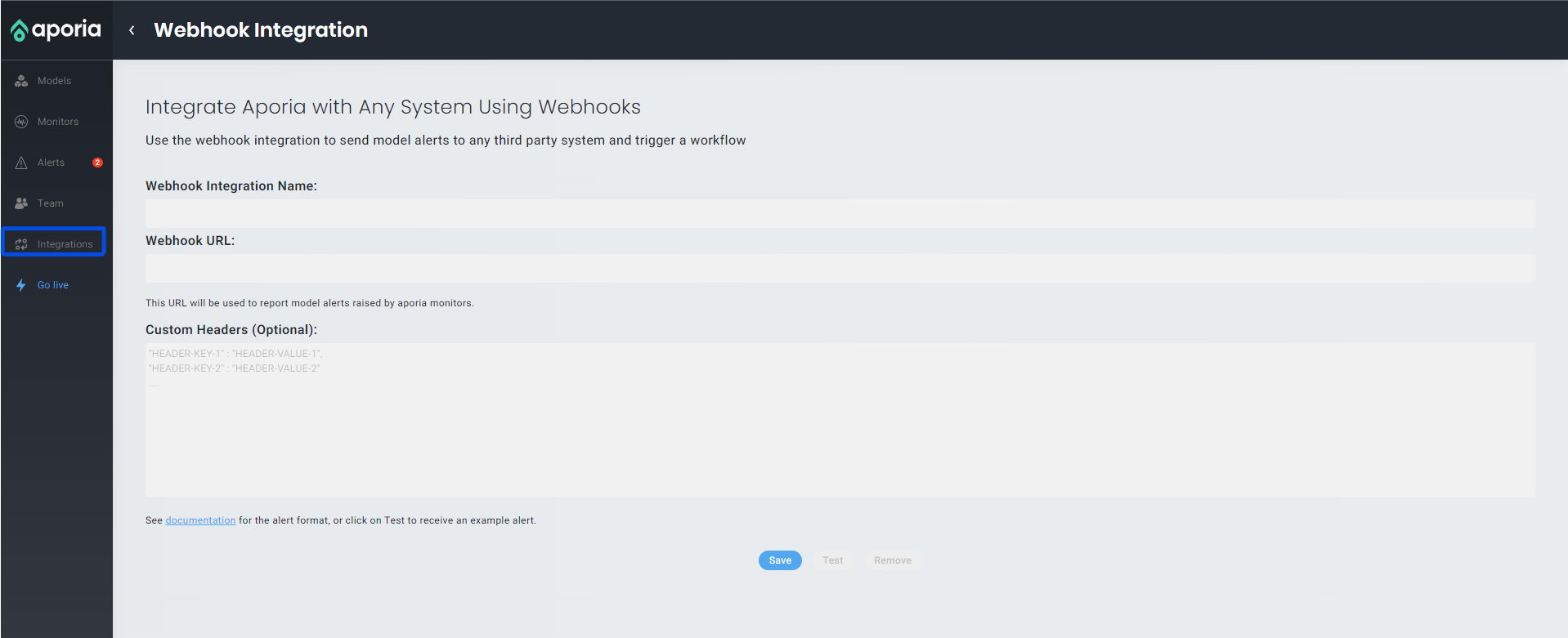
1. Log into Aporia’s console. On the navbar on the left, click on **Integrations** and choose **Webhook**.
2. Enter your **Integration Name**, **Webhook URL** and **Custom Headers**(optional). The url should include the schema (http/ https).
3. Click Save. On success the save button will become disable, and you'll be able to Test or Remove the integration.
**Congratulations: You’ve now successfully add your webhook integration to Aporia!**
After Integrating your webhook you'll be able to select sending alerts to your webhook in the **Custome mode** of the monitor builder.

### Alert's format
The alert will be sent by **POST** action to the URL defined in the integration, as a JSON in the following format:
| Key | Description |
| ------------------- | ------------------------------------------------------------------------- |
| alert\_id | The ID of the alert. |
| monitor\_type | The type of the monitor that rose the alert. |
| monitor\_id | The ID of the monitor that rose the alert. |
| monitor\_name | The name of the monitor that rose the alert. |
| model\_id | The ID of the model that the monitor created on. |
| model\_name | The name of the model that the monitor created on. |
| severity | The severity of the alert as defined when building the monitor. |
| environment | The environment the model received alert at. |
| pretty\_description | A short pretty summery about the specific alert. |
| dashboard\_link | A link for the alert in the Aporia's dashboard for farther investigation. |
You'll be able to see an example alert by clicking on **Test** in the Webhook Integration page mentioned in the previous section.
Happy Monitoring!